
website-build-skill


A skill pack that turns your AI into an expert website builder. It teaches your LLM or agent current, researched practice in design, brand, accessibility, performance, search, security, stacks and code, so the sites it builds look and work like a professional made them.
- The problem: an AI builds websites from what it remembered at training time: dated frameworks, generic layouts, and missed accessibility, speed and security basics.
- What you get: research instructions that make your AI look up what is current on the day you ask, plus design, coding, accessibility, performance, search and security playbooks and checklists it follows on every site.
Quick start
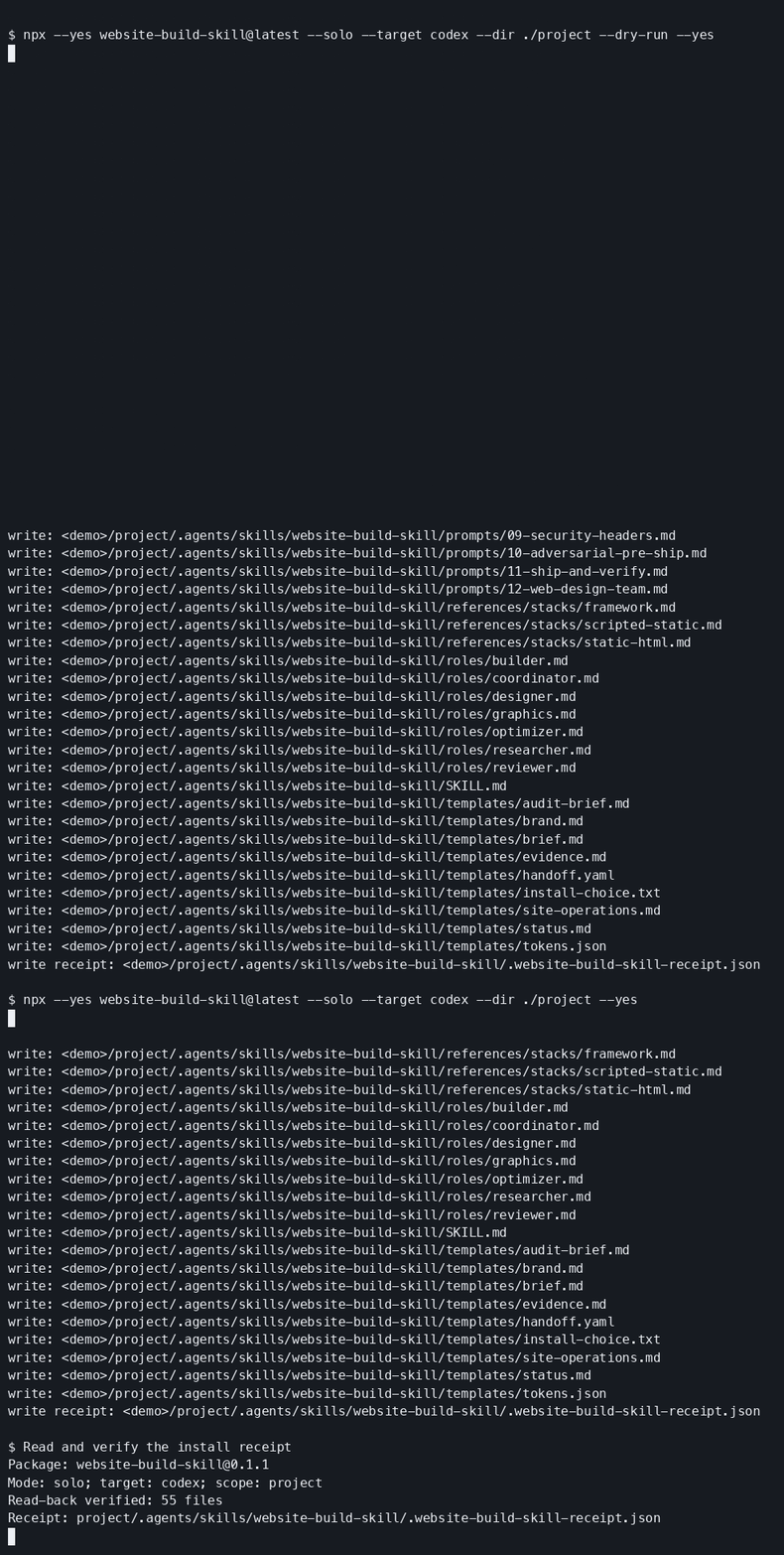
Run the npm installer in your project folder. It asks how you want to work, which host to use and where to save the work:
npx website-build-skillIt copies the skill pack into your host's folder, checks the saved files and writes a receipt.
Open your AI and ask it to read the installed SKILL.md.
Use --dry-run to preview paths. To remove files the installer wrote that still match its receipt:
npx website-build-skill --uninstall --target codex --dir . --yesUse the target and directory from your install. The installer guide covers all flags, receipts and exit codes.
For a headless install with no prompts, name SOLO or TEAM and your host:
npx website-build-skill --solo --target codex --dir . --yes
npx website-build-skill --team --target claude-code --dir . --yes
Start with one paste
For a chat AI, paste this starter and then describe the website you want:
Use option 1: Teach my AI. Help me build a website with Research, Learn, Ingest, Scope, Match, Mock, Choose, Build, Prove, Protect, Challenge and Ship. First act as Researcher: establish the request date from host evidence, then research the site's design, accessibility, performance, security, stack and search needs using current opened sources. Save a library with source URLs, publication dates or unknown, access dates, disagreements and checklists. When search is unavailable, report research as BLOCKED and return a query plan. If you lack files, return named bodies for me to save and reattach before passing the save gate. Only then confirm my brief, extract my brand or request profile/banner screenshots, and show three visual mockups. Wait for my named selection before site code. Choose the smallest fitting stack. Keep evidence and handoffs between roles. Protect means security headers and the ship security checklist; Challenge means a different model family reviews a fixed candidate read-only, and I authorize release. This starter is a compact entrypoint, so claim Ship only after the five bundles or the skill folder supply the full twelve-stage route and its checklists. Start with the site request I provide next; ask only for missing inputs that change the work.For the complete method, paste or attach the five bundles from one revision: method, prompts, playbooks, checklists, and team. Get them from the public bundle folder or the main archive. Ask your AI to name the files it read before starting.
What your AI learns
| Area | What your AI learns | Files |
|---|---|---|
| Research | It learns to inspect current sources across fourteen domains, record source dates and evidence, and recheck stale claims. | Research prompt, research and memory |
| Brand and design | It learns to extract brand tokens, distinguish observed rules from inferences, and compare three desktop and mobile designs through hierarchy, typography and composition. | Brand extraction, three mockups |
| Graphics and image rights | It learns to verify intended-use rights, choose responsive crops and formats, and inspect exported dimensions, compression and alt-text intent. | Image pipeline, brand and mockup checklist |
| Stacks and code | It learns to choose between static HTML, a scripted static builder and a framework, validate content records, and render shared templates safely. | Stack selection, data and templates |
| Languages and code quality | It learns current HTML, CSS and JavaScript/TypeScript practice for its chosen stack, including tests, linting and secure code. | Coding research, code-quality checklist |
| Accessibility | It learns to use semantic structure, test keyboard and screen-reader journeys, compute contrast, and check reflow and reduced motion. | Accessibility playbook, accessibility checklist |
| Performance | It learns to set route budgets, run repeatable Lighthouse measurements, distinguish lab scores from field data, and diagnose image, font and script costs. | Performance budgets, performance and search checklist |
| Search and answer engines | It learns SEO and AEO through visible answers, truthful structured data, canonical URLs, sitemaps and llms.txt generated from shared records. | SEO and AEO prompt, structured data and llms.txt |
| Security headers | It learns to tailor CSP and other headers to actual resources and response types, verify HTTPS readiness, and test journeys with the policy enforced. | Security headers, security checklist |
| Hosting and operations | It learns to promote an exact release artifact, verify live routes, plan rollback, and document monitoring, recovery and maintenance ownership. | Deploy and operate, ship and verify |
| Review and release | It learns to prepare a fixed candidate for review by a different model family, reproduce findings, verify fixes, and check release authority and evidence. | Adversarial review, ship checklist |
How your AI uses it on a site
Every site follows the same twelve stages, so your AI researches before it designs and checks before it ships.
- Research: save current sources, domain coverage and a research gate receipt.
- Learn: read the library and learn the checklists for the next job.
- Ingest: apply that research and record what the role learned.
- Scope: confirm the brief, available tools and artifact owners.
- Match: turn brand assets into rules, tokens and approved inferences.
- Mock: present three visual directions for your named selection.
- Choose: choose the smallest stack that fits the approved direction.
- Build: implement the selected design.
- Prove: gather accessibility, performance and search evidence.
- Protect: check security headers and exposed surfaces.
- Challenge: have a different model family review the fixed candidate read-only.
- Ship: authorize release, check the live site and save its operations document.
Method details · fictional brief.
Two ways to work
| Choice | What happens | Works with |
|---|---|---|
| 1 · Teach my AI (SOLO) | One AI learns the whole method and does every job itself. Nothing else to install. | Any AI: Claude, ChatGPT, Grok, Cursor, Copilot |
| 2 · Give me the team (TEAM) | Seven specialist agents, one per job. One command installs their files; you open each session yourself and carry the handoffs between them. Researcher goes first. | Claude Code, Codex, Hermes, Antigravity, Grok Bot |
Not sure? Pick 1. Moving to 2 later keeps everything you have already done.
The installer also asks where to save the work: an Obsidian vault folder, a folder on this computer (default: your project folder), Notion (a local working copy plus an export of the finished library), or another local folder. That folder becomes the workspace root.
SOLO follows the same jobs with saved self-handoffs. TEAM uses seven sessions you open yourself, with handoffs you carry between them and Researcher first:
- Researcher: saves the shared library before the other roles work.
- Coordinator: accepts evidence, owns the brief and routes each handoff.
- Designer: extracts brand rules and presents the visual directions.
- Graphics: produces assets and records rights, formats and exports.
- Builder: implements the chosen direction and reproduces review findings.
- Optimizer: checks search, answer-engine and discovery requirements.
- Reviewer: reviews the fixed candidate read-only from a different model family.
Works with whatever your AI has
| Your AI has | You get |
|---|---|
| Web search | Research current to the date of your request |
| File access | A research library saved in your project and read back |
| Image tools | Three visual designs to choose from |
| A second AI from another model family | An independent review before release |
| A browser or terminal | Your AI runs speed, accessibility and live checks |
| Separate agents | The seven-role team working in parallel |
| Deploy access | Your AI ships the authorized site and checks it live |
With any of these missing, the AI hands you the exact next step (a query plan, file contents to save, a review packet, commands to run) and the stage continues when you bring the result back.
Choose your host
Each guide below has a documented setup with its own loading check. Native loading is tested on Claude Code, Codex and the Grok Build CLI with dated receipts (one run each, limitations listed), and compatibility tracks current status host by host.
| Host | Set it up | What you get |
|---|---|---|
| Claude Code | Install with --target claude-code; ask it to read .claude/skills/website-build-skill/SKILL.md |
Method files; TEAM adds the full role bundles |
| Codex | Install with --target codex; ask it to read .agents/skills/website-build-skill/SKILL.md |
Method files; TEAM adds the full role bundles |
| Hermes | Install with --target hermes; follow the trust and loading steps |
Shared method files; TEAM adds the full role bundles |
| Antigravity | Install with --target antigravity; read .website-build-skill/SKILL.md |
Portable method files; TEAM adds the full role bundles |
| Grok Bot | Attach the five bundles and follow the manual team setup | Complete role instructions and addressed handoffs |
| Claude Desktop | Attach the five bundles and paste the shared instructions | The SOLO method in your chat |
| ChatGPT | Add the instructions and five bundles to a Project or custom GPT | The SOLO method and saved state packets |
See compatibility for tested hosts, documented setups and the evidence for each. For manual copying, preserve the complete skill folder, its manifest and its subdirectories in a new destination.
Where your work is saved
Choose an existing local directory during setup: a folder in your Obsidian vault, your website project or another local destination.
That output root holds site-work/, including research, source dates, brand decisions, checklists and handoffs.
Notion is an export destination with an authoritative local working copy.
For headless setup, --output-dir records the existing output root; otherwise Researcher asks before writing.
Reopen that library for later pages and refresh claims against the date of the new request.
Part of a set
Three open-source tools that work on their own and fit together:
| Repo | What it gives you |
|---|---|
| agent-personalizer | One interview writes the profile and rules every AI you use reads, kept in sync from one source. |
| model-orchestrator | Routing rules that tell your agent which model handles each task, so frontier models do the hard work and cheaper tiers do the rest. |
| website-build-skill | A skill pack that teaches your AI current website-building expertise: research, design, code, accessibility, performance, search and security. |
Tips
- Brand: supply approved assets and review screenshot-derived guesses before they become rules.
- Choice: compare hierarchy, density, typography and imagery across the mockups.
- Reuse: reopen research and refresh stale claims before another page or role.
- Scope: keep one primary action and choose the smallest fitting stack.
- Evidence: save each measured result beside its command and candidate revision.
More tips · documentation index.
For agents
Read llms.txt for the source catalog and AGENTS.md for repository instructions. For a headless project install, name SOLO or TEAM:
npx website-build-skill --solo --target codex --dir . --yes
npx website-build-skill --team --target claude-code --dir . --yes
Follow the installed SKILL.md and the recorded mode and output root in the receipt.
The installer contract defines preflight checks, exit codes and receipt-based removal.
Common questions
How do I teach Claude Code or Codex to build better websites? Run npx website-build-skill, pick your host and let it copy the skill pack into your host's folder, then ask your AI to read the installed SKILL.md. It learns current practice in research, design, code, accessibility, performance, search and security before it touches your site.
Which AI tools does it work with? Any AI that can read files works with the SOLO method, including Claude, ChatGPT, Grok, Cursor and Copilot. TEAM installs the seven workers' files for Claude Code, Codex, Hermes, Antigravity and Grok Bot in one command; you open each session yourself and carry the handoffs between them, with Researcher first; see Choose your host for each setup guide.
What does my AI research before it builds? It researches fourteen domains current to the day of your request, from design and accessibility to performance, security, stack and search, and saves a library with source URLs and access dates so later pages can refresh stale claims. See What your AI learns for the full list.
Can one AI run it, or does it need a team? Either. SOLO has one AI learn the whole method and do every job itself with nothing else to install; TEAM installs the seven workers' files in one command; you open each session yourself and carry the handoffs between them. Researcher goes first. Pick SOLO if you are not sure; moving to TEAM later keeps everything you have already done.
How do I remove it? Run npx website-build-skill --uninstall --target <your target> --dir . --yes, using the target and directory from your install; it removes only the files the installer wrote that still match its receipt. See the installer guide for flags and exit codes.
Contributing, credits and license
Contributions welcome: reproducible defects, clearer instructions, accessible examples and host evidence.
Read CONTRIBUTING, the conduct policy,
SECURITY, maintainers and release operations.
Provenance records the method's sources and attribution.
Evaluation describes the checks; run npm run build, npm run check and npm test locally.
Original package work is licensed under MIT; the covenant retains its attribution.