reactfire v2.0.0-canary.d5a1543
Reactfire
npm install reactfire
# or
yarn add reactfireHooks, Context Providers, and Components that make it easy to interact with Firebase.
By default, every reactfire hook throws a Promise until it has
connected to Firebase, allowing you to use Suspense to render a fallback component. If you don't want reactfire to throw a promise, pass an initial value to a reactfire hook. It will emit the initial value right away instead of throwing a promise.
Quickstart
⚛ + 🔥 = 🌯
We'll build a web app that displays, in real time, the tastiness of a burrito. It will listen to Cloud Firestore for its data, and we'll configure Firebase Performance Monitoring so we can get some perf stats.
Prerequisite: make sure you have Node.js installed.
In a terminal, create a fresh React app and
cdinto its directory.npx create-react-app myapp cd myappInstall reactfire and the Firebase SDK
yarn add firebase reactfire@canary
# or
npm install firebase reactfire@canary
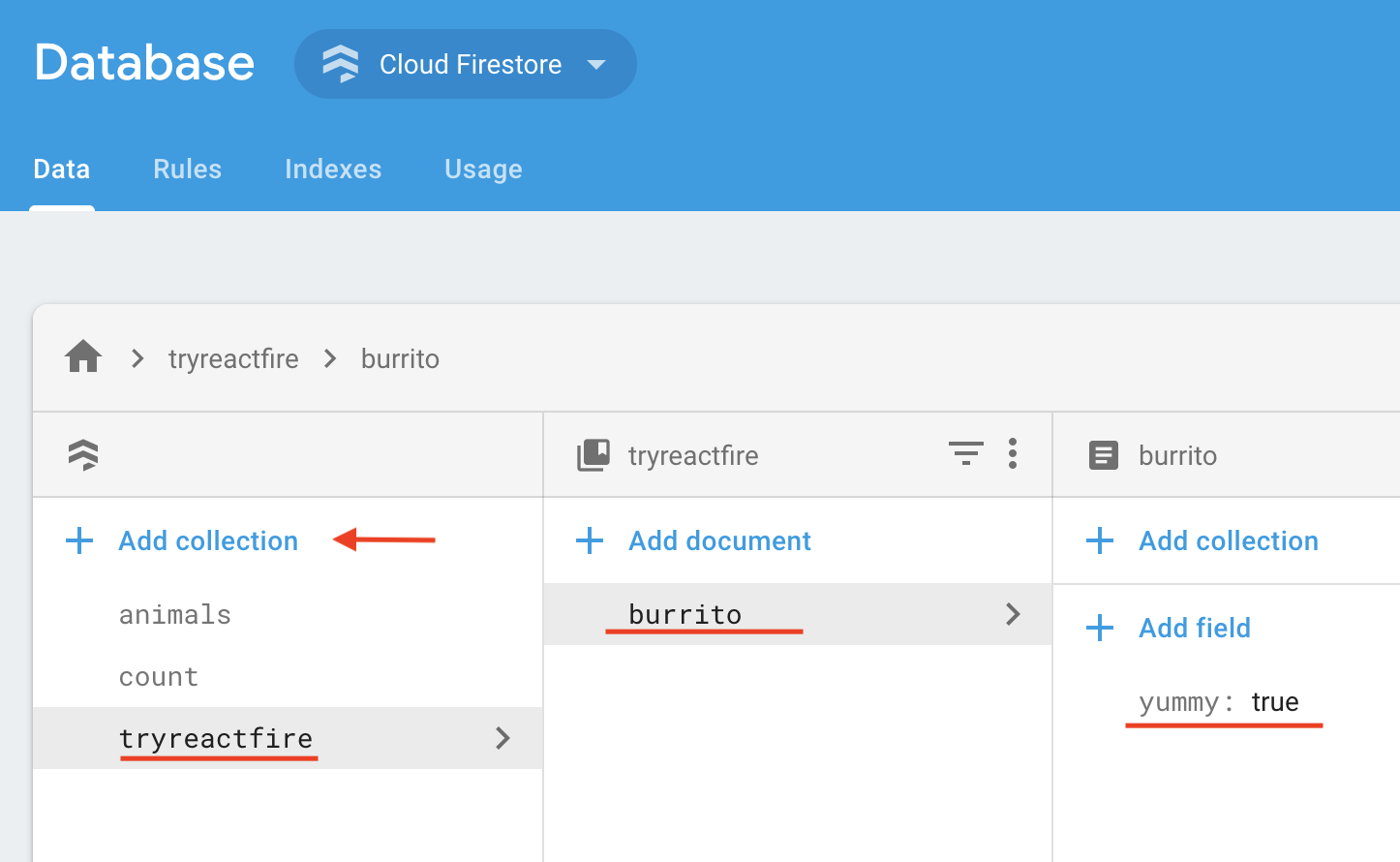
Create a document in Cloud Firestore.
- Go to the Database tab in the Firebase console. If your project doesn't have a Cloud Firestore instance yet, initialize it in locked mode
Add a document
In the Data tab of the console, click Add Collection
Name the collection tryreactfire
- Add a document with ID burrito and boolean field
yummy: true
Add the following to your security rules and click Publish
match /tryreactfire/burrito {
  allow read: if true;
  allow write: if request.auth.uid != null;
}
Modify
src/index.jsImport firebase and reactfire
//...
import { FirebaseAppProvider } from 'reactfire';
import 'firebase/performance';
//...
Wrap your app in a
FirebaseAppProviderand provide the config object from the Firebase console//... const firebaseConfig = { /* add your config object from Firebase console */ }; ReactDOM.render( <FirebaseAppProvider firebaseConfig={firebaseConfig} initPerformance> <App /> </FirebaseAppProvider>, document.getElementById('root') ); //...
Modify
src/App.jsImport
firebase/firestoreas well as theuseFirestoreDocanduseFirebaseApphooks//... import 'firebase/firestore'; import { useFirestoreDoc, useFirebaseApp, SuspenseWithPerf } from 'reactfire'; //...Add a function component
//...
function Burrito() {
  // create a ref
  const firebaseApp = useFirebaseApp();
  const burritoRef = firebaseApp
    .firestore()
    .collection('tryreactfire')
    .doc('burrito');

  // get the doc. just one line!
  const burritoDoc = useFirestoreDoc(burritoRef);

  // get the value from the doc
  const isYummy = burritoDoc.data().yummy;

  return <p>The burrito is {isYummy ? 'good' : 'bad'}</p>;
}
//...
Render your component inside of a
Suspensetag
We need to do this because
useFirestoreDocthrows a Promise while it is waiting for a response from Firestore. Suspense will catch the Promise and renderfallbackuntil the Promise is resolved.Replace the
Appfunction with the following://... function App() { return ( <div className="App"> <SuspenseWithPerf fallback={'loading burrito status...'} traceId={'load-burrito-status'} > <Burrito /> </SuspenseWithPerf> </div> ); } //...Run your app!
yarn start
# or
npm run start
Edit the value of
yummyin the Firebase console, and watch it update in real time in your app! 🔥🔥🔥But what about Firebase Performance Monitoring?
By passing the
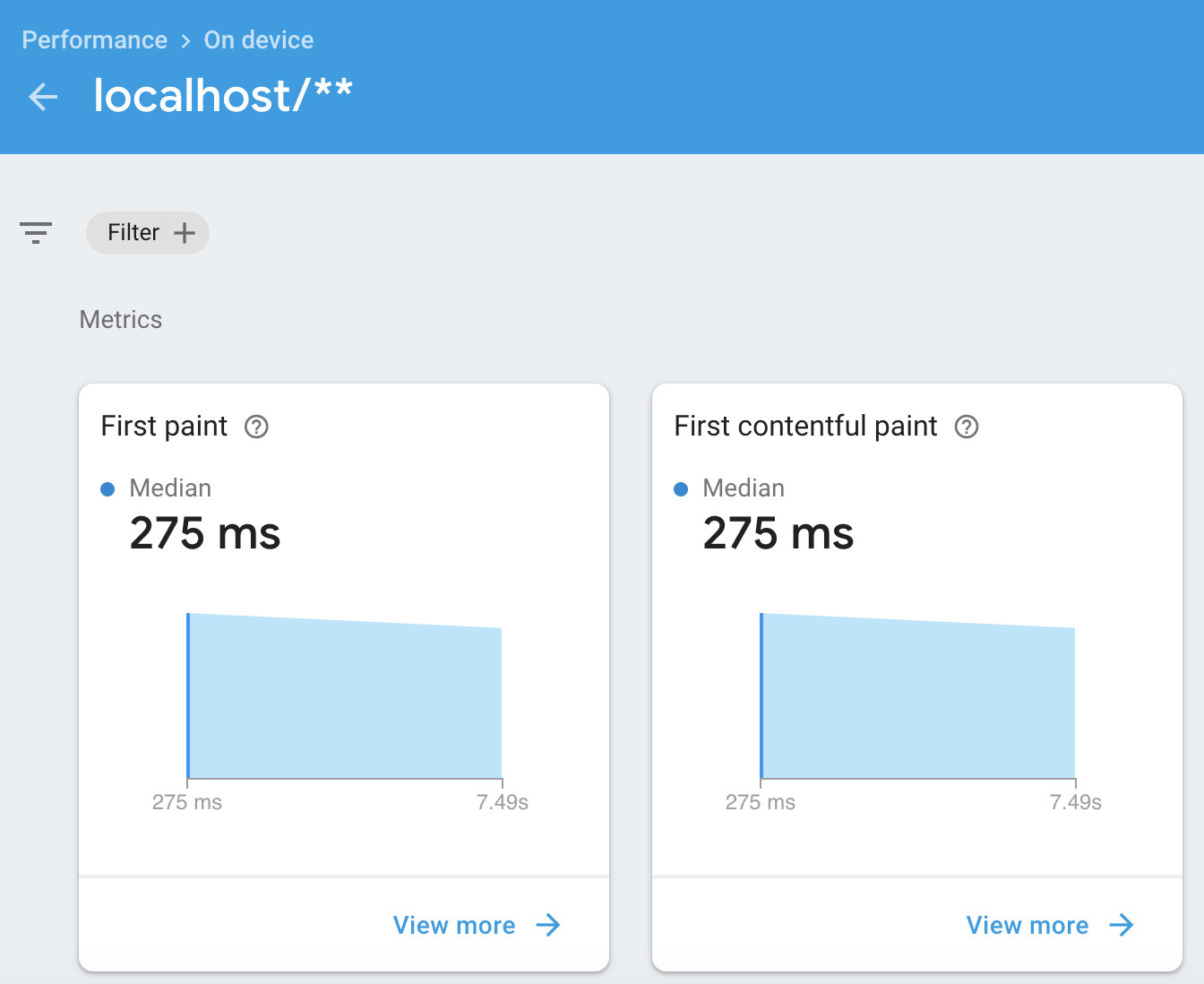
initPerformanceprop toFirebaseAppProvider, our app will automatically measure common performance stats, as well as report on our custom trace,load-burrito-status, that we set in thetraceIdprop ofSuspenseWithPerf.However, Firebase Performance Monitoring can take about 12 hours to crunch your data and show it in the Performance tab of the Firebase console.
This is an example of some of the stats in the Firebase Performance Monitoring console after 12 hours:
Docs
ToC
- Providers
- Hooks
useFirebaseApp- Authentication
- Database
- Cloud Firestore
- Realtime Database
- Cloud Storage
- Components
- Performance Monitoring
- Authentication
Providers
FirebaseAppProvider
A React Context Provider that allows the useFirebaseApp hook to pick up the firebase object.
Sample usage
const firebaseConfig = {
  /* web app config from Firebase console */
};

<FirebaseAppProvider firebaseConfig={firebaseConfig} initPerformance>
  <App />
</FirebaseAppProvider>;
Props
| Prop | Type | Description |
|---|---|---|
| config | Object | the web app config object usually passed to initializeApp |
| initPerformance | bool | Whether or not to initialize Firebase Performance Monitoring |
Hooks
useFirebaseApp
When called from a component nested inside a FirebaseAppProvider, useFirebaseApp returns the root Firebase object.
IMPORTANT: By default,
useFirebaseAppreturns a firebase object without any products attached to it (e.g. you can't callfirebase.firestore(). To do that, you need toimport 'firebase/firestore'or any other Firebase feature as needed)
Returns
useUser
Get the user that is currently signed in.
Throws a Promise by default
Parameters
| Parameter | Type | Description |
|---|---|---|
| auth ? | Auth | optional auth object. If not provided, useUser will use useFirebaseApp to find the Auth object. |
| options ? | ReactFireOptions | Options. This hook will not throw a Promise if you provide startWithValue. |
Returns
useFirestoreDoc
Listen to a Firestore Document.
Throws a Promise by default
Parameters
| Parameter | Type | Description |
|---|---|---|
| ref | DocumentReference | A reference to the document you want to listen to |
| options ? | ReactFireOptions | Options. This hook will not throw a Promise if you provide startWithValue. |
Returns
useFirestoreCollection
Listen to a Firestore Collection.
Throws a Promise by default
Parameters
| Parameter | Type | Description |
|---|---|---|
| ref | CollectionReference | A reference to the collection you want to listen to |
| options ? | ReactFireOptions | Options. This hook will not throw a Promise if you provide startWithValue. |
Returns
useDatabaseObject
Listen to a Realtime Database Object.
Throws a Promise by default
Parameters
| Parameter | Type | Description |
|---|---|---|
| ref | Reference | A reference to the object you want to listen to |
| options ? | ReactFireOptions | Options. This hook will not throw a Promise if you provide startWithValue. |
Returns
useDatabaseList
Listen to a Realtime Database list.
Throws a Promise by default
Parameters
| Parameter | Type | Description |
|---|---|---|
| ref | Reference | A reference to the list you want to listen to |
| options ? | ReactFireOptions | Options. This hook will not throw a Promise if you provide startWithValue. |
Returns
useStorageTask
Listen to a Storage UploadTask
Throws a Promise by default
Parameters
| Parameter | Type | Description |
|---|---|---|
| task | UploadTask | |
| ref | Reference | |
| options ? | ReactFireOptions |
Returns
useStorageDownloadURL
Subscribe to a storage blob's download URL
Throws a Promise by default
Parameters
| Parameter | Type | Description |
|---|---|---|
| ref | Reference | |
| options ? | ReactFireOptions |
Returns
string
Components
AuthCheck
Renders children if a user is signed in and meets the required claims. Renders fallback otherwise.
Props
| Property | Type |
|---|---|
| auth | Auth |
| children | React.Component |
| fallback | React.Component |
| requiredClaims | Object |
SuspenseWithPerf
Starts a Firebase Performance Monitoring trace and ends it when suspense stops suspending.
Props
| Property | Type |
|---|---|
| children | React.Component |
| fallback | React.Component |
| firePerf ? | any |
| traceId | string |
ReactFireOptions
| Property | Type |
|---|---|
| startWithValue | any |
Contributing
For development
yarn installcdinto the reactfire/reactfire directory. runyarn run watch.- In a new terminal,
cdinto the reactfire/sample-simple directory. runyarn start. - Head over to https://localhost:3000 to see the running sample
Testing
cdinto the reactfire/reactfire directory- run
yarn test
3 years ago
3 years ago
3 years ago
3 years ago
3 years ago
3 years ago
3 years ago
3 years ago
3 years ago
3 years ago
4 years ago
4 years ago
4 years ago
4 years ago
4 years ago
4 years ago
5 years ago
5 years ago
5 years ago
5 years ago
5 years ago
5 years ago
5 years ago
5 years ago
5 years ago
5 years ago
5 years ago
5 years ago
5 years ago
5 years ago
5 years ago
5 years ago
5 years ago
5 years ago
5 years ago
5 years ago
5 years ago
5 years ago
5 years ago
5 years ago
5 years ago
5 years ago
5 years ago
5 years ago
5 years ago
5 years ago
5 years ago
5 years ago
5 years ago
5 years ago
5 years ago
5 years ago
5 years ago
5 years ago
5 years ago
5 years ago
5 years ago
5 years ago
5 years ago
5 years ago
5 years ago
5 years ago
5 years ago
5 years ago
5 years ago
5 years ago
6 years ago
6 years ago
6 years ago
6 years ago
6 years ago
6 years ago
6 years ago
6 years ago
6 years ago
6 years ago
6 years ago
6 years ago
6 years ago
6 years ago
6 years ago
6 years ago
6 years ago
6 years ago
6 years ago
6 years ago
6 years ago
6 years ago
6 years ago
6 years ago
6 years ago
6 years ago
6 years ago
6 years ago
6 years ago
6 years ago
6 years ago
6 years ago
6 years ago
6 years ago
6 years ago
6 years ago
6 years ago
6 years ago
6 years ago
6 years ago
6 years ago
6 years ago
6 years ago
6 years ago
6 years ago
6 years ago
6 years ago
6 years ago
6 years ago
6 years ago
6 years ago
6 years ago
6 years ago
6 years ago
7 years ago
7 years ago
7 years ago
7 years ago
7 years ago
7 years ago
7 years ago
7 years ago
7 years ago
7 years ago
7 years ago
7 years ago
7 years ago
7 years ago
7 years ago
7 years ago
7 years ago
7 years ago
7 years ago
7 years ago
7 years ago
7 years ago
7 years ago
7 years ago
7 years ago
7 years ago
7 years ago
7 years ago
7 years ago
7 years ago
7 years ago
7 years ago
7 years ago
7 years ago
7 years ago
7 years ago
7 years ago
7 years ago
7 years ago
7 years ago
7 years ago
7 years ago
7 years ago
7 years ago
7 years ago
10 years ago
10 years ago
10 years ago
11 years ago
11 years ago
12 years ago
12 years ago
12 years ago
12 years ago
12 years ago
12 years ago