restful-react v7.6.1-23-g168e6e2
RESTful React
Building React apps that interact with a backend API presents a set of questions, challenges and potential gotchas. This project aims to remove such pitfalls, and provide a pleasant developer experience when crafting such applications. It can be considered a thin wrapper around the fetch API in the form of a React component.
As an abstraction, this tool allows for greater consistency and maintainability of dynamic codebases.
- Overview
- Getting Started
- Features
- Contributing
- Next Steps
Overview
At its core, RESTful React exposes a component, called Get. This component retrieves data, either on mount or later, and then handles error states, caching, loading states, and other cases for you. As such, you simply get a component that gets stuff and then does stuff with it. Here's a quick overview what it looks like.

import React from "react";
import Get from "restful-react";

const MyComponent = () => (
  <Get path="https://dog.ceo/api/breeds/image/random">
    {randomDogImage => <img alt="Here's a good boye!" src={randomDogImage && randomDogImage.message} />}
  </Get>
);

export default MyComponent;
Getting Started
To install and use this library, simply yarn add restful-react, or npm i restful-react --save and you should be good to go. Don't forget to import Get from "restful-react" or similar wherever you need it!
Features
Restful React ships with the following features that we think might be useful.
Global Configuration
API endpoints usually sit alongside a base, global URL. As a convenience, the RestfulProvider allows top-level configuration of your requests, that are then passed down the React tree to Get components.
Consider,
import React from "react";
import { RestfulProvider } from "restful-react";

import App from "./App.jsx";

const MyRestfulApp = () => (
  <RestfulProvider base="https://dog.ceo/api">
    <App />
  </RestfulProvider>
);

export default MyRestfulApp;
Meanwhile, in ./App.jsx,
import React from "react";
import Get from "restful-react";

const MyComponent = () => (
  /* Make a request to https://dog.ceo/api/breeds/image/random" */
  <Get path="/breeds/image/random">
    {randomDogImage => <img alt="Here's a good boye!" src={randomDogImage.message} />}
  </Get>
);

export default MyComponent;
Naturally, the request will be sent to the full path https://dog.ceo/api/breeds/image/random. The full API of the RestfulProvider is outlined below. Each configuration option is composable and can be overriden by Get components further down the tree.
RestfulProvider API
Here's a full overview of the API available through the RestfulProvider, along with its defaults.
// Interface
interface RestfulProviderProps<T> {
  /** The backend URL where the RESTful resources live. */
  base: string;
  /**
   * A function to resolve data return from the backend, most typically
   * used when the backend response needs to be adapted in some way.
   */
  resolve?: ResolveFunction<T>;
  /**
   * Options passed to the fetch request.
   * This can be a function if you want dynamically computed options each time.
   */
  requestOptions?: (() => Partial<RequestInit>) | Partial<RequestInit>;
}

// Usage
<RestfulProvider
  base="String!"
  resolve={data => data}
  requestOptions={authToken => ({ headers: { Authorization: authToken } })}
/>;
Here's some docs about the RequestInit type of request options.
Composability
Get components can be composed together and request URLs are an accumulation of their collective path props. Consider,
// Assuming we're using a RestfulProvider with base="https://my.web/api somewhere,
import React from "react";
import Get from "restful-react";

export default () => (
  {/* Send a request to "https://my.web/api/breeds */}
  <Get path="/breeds">
    {data => {
      return (
        <div>
          <h1>Random Image</h1>
          {/*
            Composes path with parent: sends request to https://my.web/api/breeds/image/random.
            This happens because there is no preceding / to the path.
          */}
          <Get path="image/random">
            {image => <img alt="Random Image" src={image && image.message} />}
          </Get>

          <h1>All Breeds</h1>

          {/*
            Composes path with parent: sends request to https://my.web/api/list
            The preceding slash (/) ALWAYS queries the ROOT of the RestfulProvider's base.
          */}
          <Get path="/list">
            {list => (
              <ul>{list && list.message.map(dogName => <li>{dogName}</li>)}</ul>
            )}
          </Get>
        </div>
      );
    }}
  </Get>
);
From the above example, not only does the path compose based on the nesting of each Get, but each Get can override its parent with other props as well: including having specific requestOptions if there was a valid use case.
To opt-out of this behavior Get components can use an alternative URL as their base prop.
Full Get Component API
Loading and Error States
Get components pass down loading and error states to their children, to allow for state handling. Consider,
const MyAnimalsList = props => (
  <Get path={`/${props.animal}`}>
    {(animals, { loading, error }) =>
      loading ? (
        <Spinner />
      ) : (
        <div>
          You should only see this after things are loaded.
          {error ? (
            "OH NO!"
          ) : (
            <>
              <h1>
                Here are all my {props.animal}
                s!
              </h1>
              <ul>
                {animals.map(animal => (
                  <li>{animal}</li>
                ))}
              </ul>
            </>
          )}
        </div>
      )
    }
  </Get>
);
Within Operational UI, all of our <Progress /> components support an error prop. For even better request state handling, we can write:
const MyAnimalsList = props => (
  <Get path={`/${props.animal}`}>
    {(animals, { loading, error }) =>
      loading ? (
        <Progress error={error} />
      ) : (
        <div>
          You should only see this after things are loaded.
          <h1>
            Here are all my {props.animal}
            s!
          </h1>
          <ul>
            {animals.map(animal => (
              <li>{animal}</li>
            ))}
          </ul>
        </div>
      )
    }
  </Get>
);
Lazy Fetching
It is possible to render a Get component and defer the fetch to a later stage. This is done with the lazy boolean prop. This is great for displaying UI immediately, and then allowing parts of it to be fetched as a response to an event: like the click of a button, for instance. Consider,
<Get path="/unicorns" lazy>
  {(unicorns, states, { get }) => (
    <div>
      <h1>Are you ready?</h1>
      <p>Are you ready to unleash all the magic? If yes, click this button!</p>
      <button onClick={get}>GET UNICORNS!!!!!!</button>

      {unicorns && (
        <ul>
          {unicorns.map((unicorn, index) => (
            <li key={index}>{unicorn}</li>
          ))}
        </ul>
      )}
    </div>
  )}
</Get>
The above example will display your UI, and then load unicorns on demand.
Response Resolution
Sometimes, your backend responses arrive in a shape that you might want to adapt, validate, or reshape. Other times, maybe your data consistently arrives in a { data: {} } shape, with data containing the stuff you want.
At the RestfulProvider level, or on the Get level, a resolve prop will take the data and do stuff to it, providing the final resolved data to the children. Consider,
const myNestedData = props => (
  <Get
    path="/this-should-be-simpler"
    resolve={response => response.data.what.omg.how.map(singleThing => singleThing.name)}
  >
    {data => (
      <div>
        <h1>Here's all the things I want</h1>
        <ul>
          {data.map(thing => (
            <li>{thing}</li>
          ))}
        </ul>
      </div>
    )}
  </Get>
);
Debouncing Requests
Some requests fire in response to a rapid succession of user events: things like autocomplete or resizing a window. For this reason, users sometimes need to wait until all the keystrokes are typed (until everything's done), before sending a request.
Restful React exposes a debounce prop on Get that does exactly this.
Here's an example:
const SearchThis = props => (
  <Get path={`/search?q=${props.query}`} debounce>
    {data => (
      <div>
        <h1>Here's all the things I search</h1>
        <ul>
          {data.map(thing => (
            <li>{thing}</li>
          ))}
        </ul>
      </div>
    )}
  </Get>
);
Debounce also accepts a number, which tells Get how long to wait until doing the request.
const SearchThis = props => (
-  <Get path={`/search?q=${props.query}`} debounce>
+  <Get path={`/search?q=${props.query}`} debounce={200 /*ms*/}>
    {data => (
      <div>
        <h1>Here's all the things I search</h1>
        <ul>{data.map(thing => <li>{thing}</li>)}</ul>
      </div>
    )}
  </Get>
);
It uses lodash's debounce function under the hood, so you get all the benefits of it out of the box like so!
const SearchThis = props => (
  <Get
    path={`/search?q=${props.query}`}
-   debounce={200}
+   debounce={{ wait: 200, options: { leading: true, maxWait: 300, trailing: false } }}
  >
    {data => (
      <div>
        <h1>Here's all the things I search</h1>
        <ul>{data.map(thing => <li>{thing}</li>)}</ul>
      </div>
    )}
  </Get>
);
TypeScript Integration
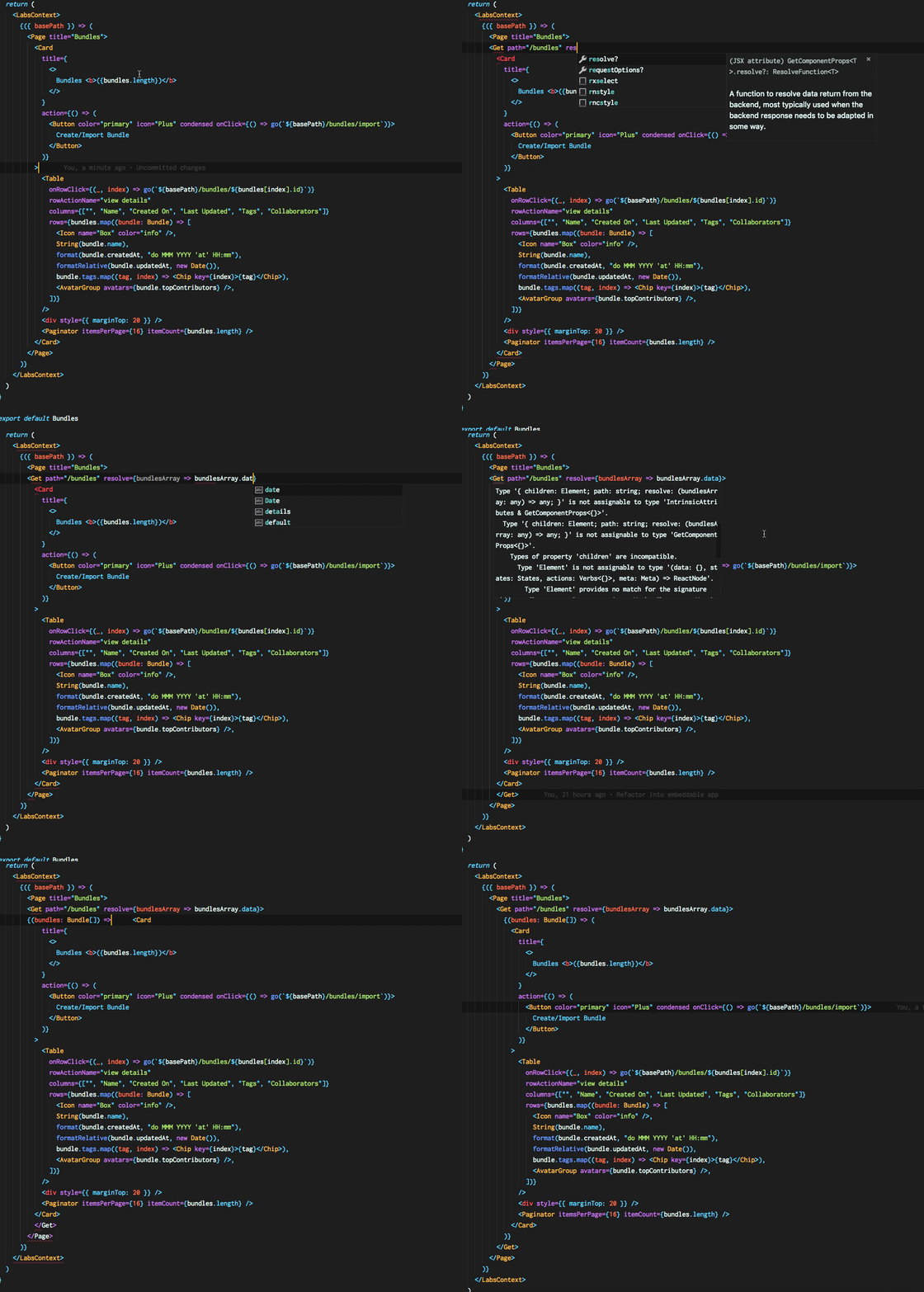
One of the most poweful features of RESTful React, each component exported is strongly typed, empowering developers through self-documenting APIs. As for returned data, simply tell your data prop what you expect, and it'll be available to you throughout your usage of children.
Query Parameters
All components in this library support query params (https://my.site/?query=param) via a queryParams prop. Each Get, Mutate and Poll component is generic, having a type signature of Get<TData, TError, TQueryParams>. If described, the queryParams prop is fully type-safe in usage and provides autocomplete functionality.
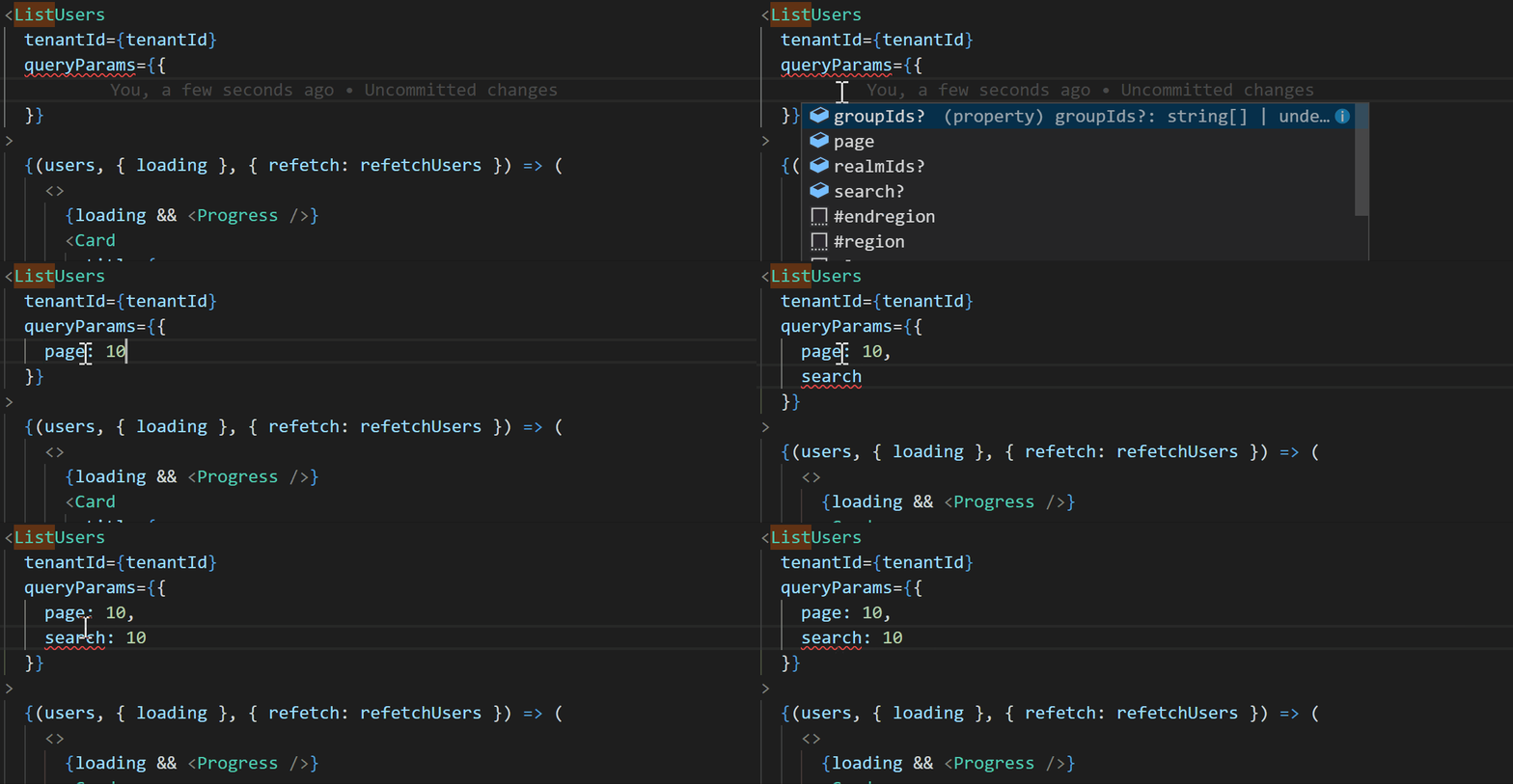
Please note that the above example was built using our OpenAPI generator in order to infer the type of component from the specification and automatically generate the entire type-safe component in a very quick and easy way.
Mutations with Mutate
Restful React exposes an additional component called Mutate. These components allow sending requests with other HTTP verbs in order to mutate backend resources.
const Movies = ({ dispatch }) => (
  <ul>
    <Get path="/movies">
      {(movies, states, actions) =>
        movies.map(movie => (
          <li>
            {movie.name}
            <Mutate verb="DELETE">
              {(deleteMovie, { loading: isDeleting }) => (
                <button onClick={() => deleteMovie(movie.id).then(() => dispatch("DELETED"))} loading={isDeleting}>
                  Delete!
                </button>
              )}
            </Mutate>
          </li>
        ))
      }
    </Get>
  </ul>
);
Mutate is strongly typed, and provides intelligent autocompletion out of the box, complete with available verbs and other self-documentation.
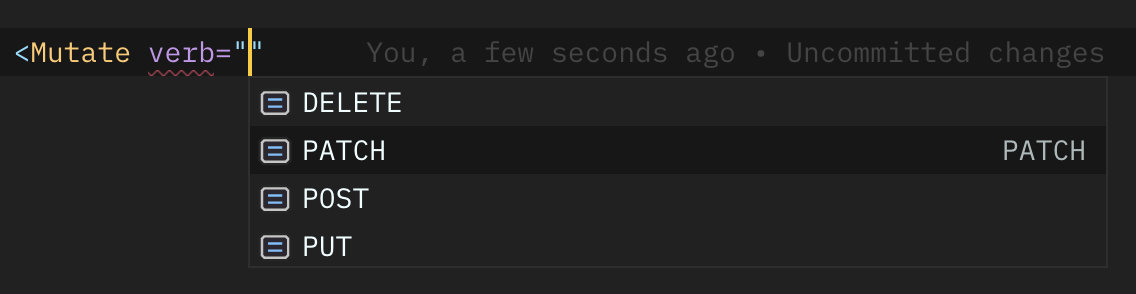
Each mutation returns a promise, that can then be used to update local component state, or dispatch an action, or do something else depending on your use case.
Full Mutate Component API
Polling with Poll
RESTful React also exports a Poll component that will poll a backend endpoint over a predetermined interval until a stop condition is met. Consider,
import { Poll } from "restful-react"

<Poll path="/deployLogs" resolve={data => data && data.data}>
  {(deployLogs: DeployLog[], { loading }) =>
    loading ? (
      <PageSpinner />
    ) : (
      <DataTable
        columns={["createdAt", "deployId", "status", "sha", "message"]}
        orderBy="createdAt"
        data={deployLogs}
        formatters={{
          createdAt: (d: DeployLog["createdAt"]) => title(formatRelative(d, Date.now())),
          sha: (i: DeployLog["sha"]) => i && i.slice(0, 7),
        }}
      />
    )
  }
</Poll>
Note the API similarities that we have already uncovered. In essence, Poll, Get and Mutate have near-identical APIs, allowing developers to quickly swap out <Get /> for <Poll /> calls and have the transition happen seamlessly. This is powerful in the world of an ever-changing startup that may have volatile requirements.
In addition to the Get component API, Poll also supports:
- an
intervalprop that will poll at a specified interval (defaults to polling 1 second), and - an
untilprop that accepts a condition expressed as a function that returns a boolean value. When this condition is met, polling will stop.- the signature of this function is
(data: T, response: Response) => boolean. As a developer, you have access to the returned data, along with the response object in case you'd like to stop polling ifresponse.ok === false, for example.
- the signature of this function is
Below is a more convoluted example that employs nearly the full power of the Poll component.
<Poll path="/status" until={(_, response) => response && response.ok} interval={0} lazy>
  {(_, { loading, error, finished, polling }, { start }) => {
    return loading ? (
      <Progress error={error} />
    ) : (
      <Button
        loading={editorLoading || polling}
        condensed
        icon="ExternalLink"
        color="ghost"
        onClick={() => {
          if (finished) {
            return window.open(editor.url);
          }
          requestEditor();
          start();
        }}
      >
        {finished ? "Launch Editor" : "Request Editor"}
      </Button>
    );
  }}
</Poll>
Note from the previous example, Poll also exposes more states: finished, and polling that allow better flow control, as well as lazy-start polls that can also be programatically stopped at a later stage.
Long Polling
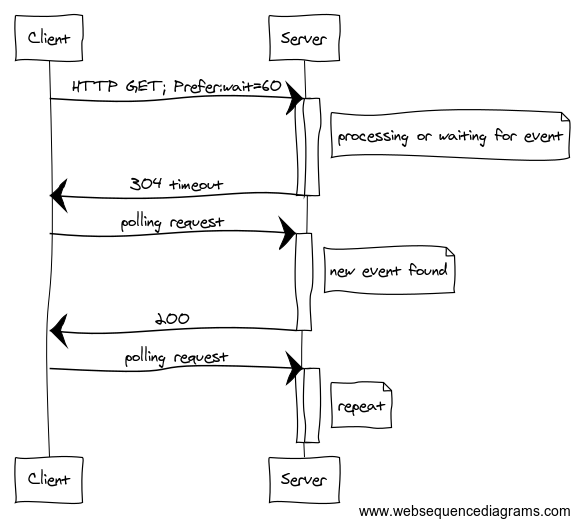
At Contiamo, we have a powerful Long Polling specification in place that allows us to build real-time apps over HTTPS, as opposed to WebSockets. At a glance the specification can be distilled into:
- Web UI sends a request with a
Preferheader that contains:- a time, in seconds, to keep requests open (
60s), and - a polling index that is a server-sent hash
ahpiegh. - all together, the client sends a request with a header
Prefer: wait=60s;index=939192.
- a time, in seconds, to keep requests open (
- The backend server responds, either with:
- an empty response with status
304 Not Modified - a successful response with data and a new polling index.
- an empty response with status
The polling index allow the client and the server to stay in sync: the client says "the last stuff I got was at this index". The server says "oh, let me get you up to speed and send you a new index".
Visually, this is represented as below.
 .
.
To get this functionality in Restful React, it is as simple as specifying a wait prop on your Poll component, provided your server implements the specification as well.
Full Poll Component API
Code Generation
Restful React is able to generate type-safe React components from any valid OpenAPI v3 or Swagger v2 specification, either in yaml or json formats.
Usage
Type-safe React data fetchers can be generated from an OpenAPI specification using the following command:
restful-react import --file MY_OPENAPI_SPEC.yaml --output my-awesome-generated-types.d.tsx
This command can be invoked by either:
- Installing
restful-reactglobally and running it in the terminal:npm i -g restful-react, or - Adding a
scriptto yourpackage.jsonlike so:
      "scripts": {
        "start": "webpack-dev-server",
        "build": "webpack -p",
+       "generate-fetcher": "restful-react import --file MY_SWAGGER_DOCS.json --output FETCHERS.tsx"
      }
Your components can then be generated by running npm run generate-fetcher. Optionally, we recommend linting/prettifying the output for readability like so:
      "scripts": {
        "start": "webpack-dev-server",
        "build": "webpack -p",
        "generate-fetcher": "restful-react import --file MY_SWAGGER_DOCS.json --output FETCHERS.tsx",
+       "postgenerate-fetcher": "prettier FETCHERS.d.tsx --write"
      }
Validation of the specification
To enforce the best quality as possible of specification, we have integrate the amazing open-api linter from ibm (OpenAPI Validator). We strongly encourage you to setup your custom rules with a .validaterc file, you can find all useful information about this configuration here.
If it's too noisy, you don't have the time or can't control the open-api specification: just add --no-validation flag to the command and this validation step will be skipped :wink:
Import from GitHub
Adding the --github flag to restful-react import instead of a --file allows us to create React components from an OpenAPI spec remotely hosted on GitHub. (how is this real life 🔥 )
To generate components from remote specifications, you'll need to follow the following steps:
- Visit your GitHub settings.
Click Generate New Token and choose the following:
Token Description: (enter anything, usually your computer name)
Scopes:
    [X] repo
        [X] repo:status
        [X] repo_deployment
        [X] public_repo
        [X] repo:invite
Click Generate token.
- Copy the generated string.
- Open Terminal and run
restful-react import --github username:repo:branch:path/to/openapi.yaml --output MY_FETCHERS.tsx. - You will be prompted for a token.
- Paste your token.
You will be asked if you'd like to save it for later. This is entirely up to you and completely safe: it is saved in your
node_modulesfolder and not committed to version control or sent to us or anything: the source code of this whole thing is public so you're safe.Caveat: Since your token is stored in
node_modules, your token will be removed on eachnpm installofrestful-react.You're done! 🎉
Transforming an Original Spec
In some cases, you might need to augment an existing OpenAPI specification on the fly, for code-generation purposes. Our CLI makes this quite easy:
restful-react import --file myspec.yaml --output mybettercomponents.tsx --transformer path/to/my-transformer.jsThe function specified in --transformer is pure: it imports your --file, transforms it, and passes the augmented OpenAPI specification to Restful React's generator. Here's how it can be used:
// /path/to/my-transformer.js

/**
 * Transformer function for restful-react.
 *
 * @param {OpenAPIObject} schema
 * @return {OpenAPIObject}
 */
module.exports = inputSchema => ({
  ...inputSchema,
  // Place your augmentations here
  paths: Object.entries(schema.paths).reduce(
    (mem, [path, pathItem]) => ({
      ...mem,
      [path]: Object.entries(pathItem).reduce(
        (pathItemMem, [verb, operation]) => ({
          ...pathItemMem,
          [verb]: {
            ...fixOperationId(path, verb, operation),
          },
        }),
        {},
      ),
    }),
    {},
  ),
});
Caching
This doesn't exist yet. Feel free to contribute a solution here.
An LRU cache would be nice.
Contributing
All contributions are welcome – especially:
- documentation,
- bug reports and issues,
- code contributions.
Code
If you'd like to actively develop or maintain this project, clone the repo and then yarn watch to get into dev mode. There are existing tests against which you can test the library. Typically, this looks like
git clone git@github.com:contiamo/restful-react.gitcd restful-reactyarn installyarn test --watch
From there, you should be able to start developing without problems.
Dogfooding
This project works great when dogfooded: I'd suggest creating a separate project somewhere (or using an existing one), and using your fork in your project. To do so, after cloning and npm i,
npm linkinside of the root folder of this project,- go to your consumer project,
npm link restful-reactin there, andnpmwill link the packages.
You can now import Get from "restful-react" and do all the things you'd like to do, including test and develop new features for the project to meet your use case.
Next Steps
We're actively developing this at Contiamo to meet our use cases as they arise. If you have a use case that you'd like to implement, do it! Open an issue, submit a Pull Request, have fun! We're friendly.
4 years ago
4 years ago
4 years ago
4 years ago
5 years ago
5 years ago
5 years ago
5 years ago
5 years ago
5 years ago
5 years ago
5 years ago
5 years ago
5 years ago
5 years ago
5 years ago
5 years ago
5 years ago
5 years ago
5 years ago
5 years ago
5 years ago
5 years ago
5 years ago
5 years ago
5 years ago
5 years ago
5 years ago
5 years ago
5 years ago
5 years ago
5 years ago
5 years ago
5 years ago
5 years ago
5 years ago
5 years ago
6 years ago
6 years ago
6 years ago
6 years ago
6 years ago
6 years ago
6 years ago
6 years ago
6 years ago
6 years ago
6 years ago
6 years ago
6 years ago
6 years ago
6 years ago
6 years ago
6 years ago
6 years ago
6 years ago
6 years ago
6 years ago
6 years ago
6 years ago
6 years ago
6 years ago
6 years ago
6 years ago
6 years ago
6 years ago
6 years ago
6 years ago
6 years ago
6 years ago
6 years ago
6 years ago
6 years ago
6 years ago
6 years ago
6 years ago
6 years ago
6 years ago
6 years ago
6 years ago
6 years ago
6 years ago
6 years ago
6 years ago
6 years ago
6 years ago
6 years ago
6 years ago
6 years ago
6 years ago
6 years ago
6 years ago
6 years ago
6 years ago
6 years ago
6 years ago
6 years ago
6 years ago
6 years ago
6 years ago
6 years ago
6 years ago
6 years ago
6 years ago
6 years ago
6 years ago
6 years ago
6 years ago
6 years ago
6 years ago
6 years ago
7 years ago
7 years ago
7 years ago
7 years ago
7 years ago
7 years ago
7 years ago
7 years ago
7 years ago
7 years ago
7 years ago
7 years ago
7 years ago
7 years ago
7 years ago
7 years ago
7 years ago
7 years ago
7 years ago
7 years ago
7 years ago
7 years ago
7 years ago
7 years ago
7 years ago
7 years ago
7 years ago
7 years ago
7 years ago
7 years ago
7 years ago
7 years ago
7 years ago
7 years ago
7 years ago
7 years ago
7 years ago
7 years ago
7 years ago
7 years ago
7 years ago
7 years ago
7 years ago
7 years ago
7 years ago
7 years ago
7 years ago
7 years ago
7 years ago
7 years ago
7 years ago
7 years ago
7 years ago
7 years ago
7 years ago
7 years ago
7 years ago
7 years ago
8 years ago
8 years ago
8 years ago
8 years ago
8 years ago
8 years ago
8 years ago
8 years ago
8 years ago
8 years ago
8 years ago
8 years ago
8 years ago
8 years ago
8 years ago
8 years ago
8 years ago
8 years ago
8 years ago
8 years ago
8 years ago
8 years ago
8 years ago
8 years ago
8 years ago
8 years ago
8 years ago
8 years ago
8 years ago