instapack v6.0.0-beta1
instapack
All-in-one web app client project compiler using TypeScript and Sass! :package: :rocket:



Install
npm install -g instapack
If you encounter errors during installation, try:
Running install as Administrator or using elevated privileges (sudo).
Or clear the npm cache:
npm cache clean --forcethen:npm install -g instapack --no-optionalOr downgrade to npm 4 to avoid buggy npm 5:
npm install -g npm@4Or use Yarn instead:
yarn global add instapack
Quick Start Guide
cd E:\VS\MyWebApp
ipack new empty
ipack
Programmable API is also provided if you wish to integrate instapack into your very own build script:
const instapack = require('instapack');

let ipack = new instapack();
ipack.build('all');
Practical guides can be read in books folder.
System Requirements
Currently supported Node.js is the latest version 8 LTS.
When using Visual Studio 2017 (Update 2 or above), install the latest TypeScript SDK for Visual Studio 2017.
When using Visual Studio 2015 (Update 3 or above), install the latest TypeScript SDK for Visual Studio 2015.
If using the latest Visual Studio Code, it should come with the latest TypeScript support out of the box.
Features
Hyper-opinionated web app client project builder with near-zero configurations. It just works. :sparkling_heart:
Built-in new project scaffold tool. :gift:
Rich debugging experience using DevTools: set breakpoints, view variable values, and step into the TypeScript source code directly in the browser! :mag:
Design Goals
Lower the barrier of entry for developing a modern web app. :angel:
Introduce structure to the app client source code. :office:
Improve source code quality and maintainability with type hints and compile-time checks. :eyeglasses:
Enforce best practices when building apps, which may significantly impact page load time. (e.g. bundling and minification) :airplane:
Unify team build system across multiple projects, for any frameworks. :fist:
Blur the boundary between design time and coding time using lightning fast
watch+devcompilation mode. :zap:
But... Why?
Recently every f-ing framework on this planet :earth_asia: has their own CLI, but only few are able to support TypeScript out of the box. So most people gave up on TypeScript right off the bat... :broken_heart:
instapack is an initiative to develop a command line tool for compiling most apps developed using mainstream JavaScript frameworks, with a :lemon: twist: It can easily build an app written in TypeScript with minimal or no further configurations!
Powered by webpack, instapack effortlessly devours modules written using modern JS standards (ES Harmony, CommonJS, AMD, UMD) and is capable of importing HTML templates out of the box. instapack is battle-tested :hocho: and is designed to cover 99.99% normal use cases when developing a modern web app.
With this powerful tool, you can save time :watch:, save precious SSD space :space_invader:, and save yourself from the pain of manually maintaining project build scripts! :coffee:
How does it work?
Out of the box, these files will be used as the entry points:
client/js/index.ts, compiled towwwroot/js/ipack.jsclient/css/index.scss, compiled towwwroot/css/ipack.cssThe Sass language compiler service has been configured to enable
@importfromnode_modules!Spiced with :hot_pepper: PostCSS AutoPrefixer for applying CSS vendor-prefixes automatically!
Concatenate files listed in
package.json. Read more below.
Commands
You may use instapack or ipack or ipk to invoke the command line interface.
new template
Scaffolds a new instapack project into your existing app folder where the command line is invoked. The following templates are available:
emptywhen you need a minimal clean slate. Use this template to author new templates!vuewhen you want to develop a web app with Vue.js and Bootstrap 4. (Includes aspnet-validation for ASP.NET MVC client-side validation.)reactwhen you want to develop a web app with React and Semantic UI.infernowhen you want to develop a web app with Inferno and Bootstrap 4.angularjswhen you need to develop a legacy web app with AngularJS (1.X), jQuery, and Bootstrap 3. (Includes jquery-validation-unobtrusive for ASP.NET MVC client-side validation.)
If no template parameter is provided, vue will be chosen.
build project
Performs compilation against selected project type. Available projects: all, js, css and concat. If no project parameter is provided, all will be chosen.
In addition, build flags are available:
-wor--watchenables incremental compilation on source code changes.-dor--devdisables outputs minification for fast build!-uor--uncharteddisables source maps. (Slightly improves build speed)-por--parallelenables experimental parallel build across all CPU threads! :trident:
You can combine multiple build flags, for example:
ipack -dw=dev+watchmode for massive productivity gainz! :muscle:
clean
Remove files in the output folders.
Configuration
instapack puts configuration inside package.json to reduce project files clutter. For example, this is the included package.json with vue template:
{
  "name": "aspnet",
  "version": "1.0.0",
  "private": true,
  "instapack": {
    "output": "wwwroot",
    "concat": {
      "vendor": [
        "es6-promise/dist/es6-promise.auto",
        "bootstrap.native/dist/polyfill",
        "bootstrap.native/dist/bootstrap-native-v4"
      ]
    },
    "alias": {
      "vue": "vue/dist/vue.common"
    }
  },
  "dependencies": {
    "@types/requirejs": "^2.1.31",
    "aspnet-validation": "^0.0.4",
    "axios": "^0.18.0",
    "bootstrap": "4.0.0",
    "bootstrap.native": "^2.0.21",
    "es6-promise": "^4.2.4",
    "font-awesome": "^4.7.0",
    "linqts": "^1.10.0",
    "moment": "^2.20.1",
    "noty": "^3.2.0-beta",
    "tslib": "^1.9.0",
    "vee-validate": "^2.0.4",
    "vue": "^2.5.13",
    "vue-class-component": "^6.2.0"
  }
}inputallows setting the input folder name. By default, it is set toclientoutputallows setting the output folder name. By default, it is set towwwrootjsOutallows setting the JS output file name. By default, it is set toipack.jscssOutallows setting the CSS output file name. By default, it is set toipack.cssaliasallows overriding moduleimportcalls from all files, including dependencies. Read more: https://webpack.js.org/configuration/resolve/- This was needed because the default Vue.js package main file points to runtime-only build, which does not include the HTML template compiler... To avoid using this, read the template configuration below.
externalsallows rewriting moduleimportcalls from all files, including dependencies, to globally exposed objects viawindowobject. Read more: https://webpack.js.org/configuration/externals/
For example:
{
  "instapack": {
    "externals": {
      "jquery": "$"
    }
  }
}
converts this...
import jQuery from 'jquery';into this...
const jQuery = window["$"];so CDN can be used! :tada:
<script src="https://unpkg.com/jquery@3.2.1/dist/jquery.js"></script>concatallows packing browser libraries to be consumed directly from<script src="...">rather than as a module.The file names will be resolved node-style (but NOT their contents), which allows concatenating packages downloaded from
npmto be bundled, minified, and then placed into the output JS folder.Use concatenation for libraries that cannot be imported / do not need to be imported (for example, jQuery plugins). This hybrid approach allows greater compatibility with older libraries, while enjoying the rich development experience using TypeScript.
You can also use concat to improve compile time by placing vendored modules out of the app code bundle!
For consuming the libraries within the TypeScript app code, load them before
bundle.jsthen use theexternalsmodule configuration (declare a global TypeScript module definition if not a npm module).Alternatively, reference the library objects directly from the
windowobject (e.g.window['$']).
concat configuration example: (produces vendor.js bundle)
{
  "instapack": {
    "concat": {
      "vendor": [
        "jquery",
        "bootstrap",
        "jquery-validation",
        "jquery-validation-unobtrusive",
        "./client/lib/my-old-jquery-plugin"
      ]
    }
  }
}- Normally, HTML files will be minified and then stringified to allow working libraries / frameworks such as AngularJS or Mustache / Handlebars. In pursuit of improved app performance, instapack allows Ahead-of-Time (AoT) compilation of HTML templates using Vue.js render syntax. HTML files with special file extension
.vue.htmlwill be compiled into an object to be passed into Vue Component as parameters:
import Vue from 'vue';
import Component from 'vue-class-component';
import { render, staticRenderFns } from './MyComponent.vue.html';

@Component({
    render, staticRenderFns
})
export class MyComponent extends Vue {
}
A global TypeScript definition file for
*.vue.htmlmodule is required for importing a template using ES Module syntax. That file will be created for you when using thevuenew project template!
Release Cadence
Starting version 4.0.0, instapack follows Semantic Versioning.
Bi-weekly releases (usually on 14th and 28th date of each month) will be performed for updating package dependencies. Bug reports will be dealt promptly. These actions will increment the patch version.
New non-breaking features will increment the minor version. Breaking changes will increment the major version.
Occasionally, beta builds will be published (instapack@beta) for showcasing the bleeding edge version of the tool.
Alternatively, you may build directly from the source code repository:
git clone https://github.com/ryanelian/instapack.git
cd instapack
npm link        # symlink global to local package for development
npm run build   # alternatively, `npm install -g typescript` then `tsc`
ipack --version
FAQ
Can I use insert_framework_name_here ?
Yes, absolutely!
You can even use jQuery or plain vanilla JS; don't worry, we're not gonna judge. :smile:
Add the packages required for your project using yarn / npm then start hacking. We'll take care of the outputs.
Also, pull requests are welcomed if you have a great starting templates and books for those projects. We'd love to expand our collections!
What are the breaking changes when upgrading from instapack 4?
Our supported Node.js runtime is now the latest version 8 LTS.
Node.js 8.3.0 and above ships with Ignition + Turbofan execution pipeline which boost overall compiler performance and shrink memory footprints!
Internally, we've moved from Browserify to the more modern webpack module bundler.
We have a new recommended
tsconfig.json. Type:ipack new tsconfigin your project root folder (where thepackage.jsonandtsconfig.jsonis located) to upgrade!It uses a standardized
ES2015module code generation instead ofCommonJSIt allows Synthetic Default Imports syntax for importing non-ES modules just like a default-exported ES modules!
We've changed the CSS input file entry point from
site.scsstoindex.scss. Please rename the said file!We've changed the default JS and CSS output file names to
ipack.js(frombundle.js) andipack.css(fromsite.css).Make sure to update your
<script src="...">and<link href="..." />references in the HTML files!If that action is prohibitive, simply use the new
jsOutandcssOutoptions to emit output file names identical to instapack 4:
{
  "instapack": {
    "jsOut": "bundle.js",
    "cssOut": "site.css",
  }
}
What are the breaking changes when upgrading from instapack 5?
HTML template compilation mode in package.json (string vs vue) has been removed in favor of special extension .vue.html. This change allows a project to have both stringified HTML and pre-compiled Vue.js HTML. This change also simplifies instapack to make it more beginner-friendly by reducing the number of options / flags and templates (removed vue+).
In light of the final version of AngularJS 1.7 LTS, it is recommended for newer projects to use Vue.js / React / Inferno instead. To reflect this suggestion, angular-material template has been removed and angular-bootstrap template has been renamed to angularjs. jQuery has been re-added into angularjs template to improve compatibility with legacy browser, especially with Bootstrap 3.
I thought files should not be bundled because of HTTP/2?
Also, in IIS, HTTP/2 is only supported when using Windows Server 2016. Many of our customers are still using Windows Server 2012 R2 to date.
Can I change the index.ts / index.scss entry point?
Nope.
Can I change the js / css folder name?
Nope.
My package restore / IDE is slow. Help!
Windows Defender or other anti-virus software appear to slow down package restore and IDEs when opening projects.
For this very reason, it is highly recommended to:
Add anti-virus exclusion to Yarn installation folder:
C:\Program Files (x86)\Yarn. To double check, type:where.exe yarnAdd anti-virus exclusion to Yarn cache folder:
C:\Users\Ryan\AppData\Local\Yarn. To double check, type:yarn cache dirAdd anti-virus exclusion to NodeJS installation folder:
C:\Program Files\nodejs. To double check, type:where.exe nodeAdd anti-virus exclusion to Git installation folder:
C:\Program Files\Git. To double check, type:where.exe gitUse very short root folder name for projects, such as
D:\VS, to avoid potential problems with Windows system paths over 260 characters long. Then exclude the folder from the anti-virus.
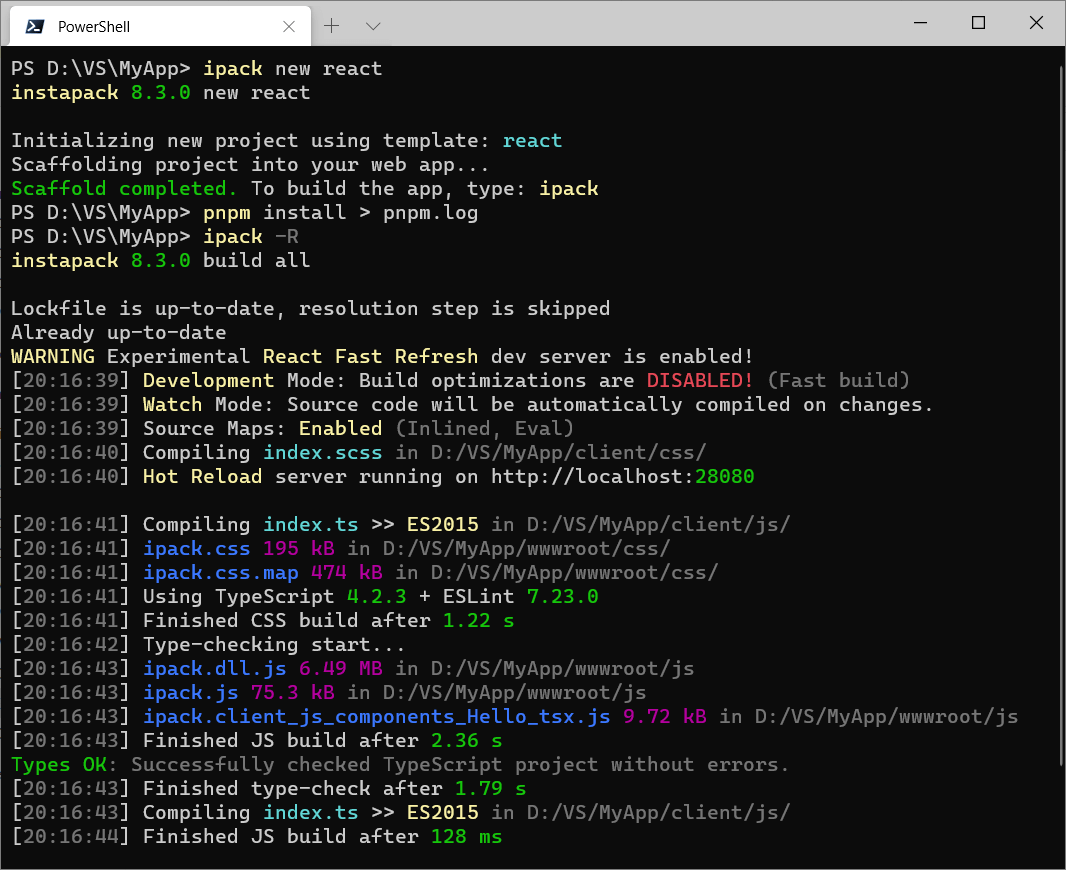
Your PowerShell is cute. How to?
Set-ExecutionPolicy RemoteSigned -scope CurrentUser
iex (new-object net.webclient).downloadstring('https://get.scoop.sh')
scoop install concfg
concfg import firefly
For more information, visit http://scoop.sh/ and https://github.com/lukesampson/concfg
5 years ago
6 years ago
6 years ago
6 years ago
6 years ago
6 years ago
6 years ago
6 years ago
6 years ago
6 years ago
6 years ago
6 years ago
6 years ago
6 years ago
6 years ago
6 years ago
6 years ago
6 years ago
6 years ago
6 years ago
6 years ago
6 years ago
6 years ago
6 years ago
6 years ago
6 years ago
7 years ago
7 years ago
7 years ago
7 years ago
7 years ago
7 years ago
7 years ago
7 years ago
7 years ago
7 years ago
7 years ago
7 years ago
7 years ago
7 years ago
7 years ago
7 years ago
7 years ago
7 years ago
7 years ago
7 years ago
7 years ago
7 years ago
7 years ago
7 years ago
7 years ago
7 years ago
7 years ago
7 years ago
7 years ago
7 years ago
7 years ago
7 years ago
7 years ago
7 years ago
7 years ago
7 years ago
7 years ago
7 years ago
7 years ago
7 years ago
7 years ago
7 years ago
8 years ago
8 years ago
8 years ago
8 years ago
8 years ago
8 years ago
8 years ago
8 years ago
8 years ago
8 years ago
8 years ago
8 years ago
8 years ago
8 years ago
8 years ago
8 years ago
8 years ago
8 years ago
8 years ago
8 years ago
8 years ago
8 years ago
8 years ago
8 years ago
8 years ago
8 years ago
8 years ago
8 years ago
8 years ago
8 years ago
8 years ago
8 years ago
8 years ago
8 years ago
8 years ago
8 years ago
8 years ago
8 years ago
8 years ago
8 years ago
8 years ago
8 years ago
8 years ago
8 years ago
8 years ago
8 years ago
8 years ago
8 years ago
8 years ago
8 years ago
8 years ago
8 years ago
8 years ago
8 years ago
8 years ago
8 years ago
8 years ago
8 years ago
8 years ago
8 years ago
8 years ago
8 years ago
8 years ago
8 years ago
8 years ago
8 years ago
8 years ago
8 years ago
8 years ago
8 years ago
8 years ago
8 years ago
8 years ago
8 years ago
8 years ago
8 years ago
8 years ago
8 years ago
8 years ago
8 years ago
8 years ago
8 years ago
8 years ago
8 years ago
8 years ago
8 years ago
8 years ago
8 years ago
8 years ago
8 years ago
9 years ago
9 years ago
9 years ago
9 years ago
9 years ago
9 years ago
9 years ago
9 years ago
9 years ago
9 years ago
9 years ago
9 years ago
9 years ago
9 years ago
9 years ago
9 years ago
9 years ago
9 years ago
9 years ago
9 years ago
9 years ago
9 years ago
9 years ago
9 years ago
9 years ago
9 years ago
9 years ago
9 years ago
9 years ago
9 years ago
9 years ago
9 years ago
9 years ago
9 years ago
9 years ago
9 years ago
9 years ago
9 years ago
9 years ago
9 years ago
9 years ago
9 years ago
9 years ago
9 years ago
9 years ago
9 years ago
9 years ago
9 years ago
9 years ago
9 years ago
9 years ago
9 years ago
9 years ago
9 years ago
9 years ago
9 years ago
9 years ago
9 years ago